Posts

Deny User or group access to the Web Application

Perfect Solution http://sharepointtechie.blogspot.com/2010/10/deny-users-access-on-entire-portal-web.html 

Disabling the threshold for SharePoint List and Document Library

$web = Get-SPWeb -Identity http://site $web.AllowUnsafeUpdates = $true $list = $web.Lists["ListName"] $list.EnableThrottling = $false $list.Update() $web.AllowUnsafeUpdates = $false $list.EnableThrottling $web.Update() $web.Dispose()

Sharepoint - how to set permission level from Nintex to add/edit item

Problem: The form cannot be submitted to the specified SharePoint list or document library. The SharePoint location may be read-only or you may not have permissions to access it. OR  The workflow could not update the item, possibly because one or more columns for the item require a different type of information. Solution: Go to the List Settings then Advanced Settings and then set /verify options for Read Access / Edit Access.
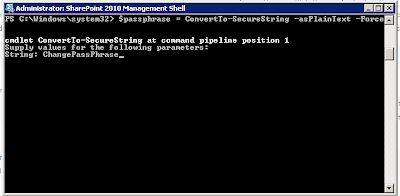
Get the passphrase in SharePoint 2010

Image
Run following commands in SharePoint Power Shell: $passphrase = ConvertTo-SecureString -asPlainText -Force Set-SPPassPhrase -PassPhrase $passphrase -Confirm

SharePoint Enable Audit Logs

Open SharePoint Power Shell, run following commands: $site=Get-SPSite http://sitecollection $site.Audit.AuditFlags = [Microsoft.SharePoint.SPAuditMaskType]::All $site.Audit.Update(); SPAuditMaskType: None No events or actions. CheckOut Check out of the object. CheckIn Check in of the object. View Viewing of the object by a user. Delete Deletion of the object. Update Update of the object. ProfileChange Change of a profile. ChildDelete Deletion of one of the object's child objects. SchemaChange Change of the object's schema. SecurityChange Change in a security configuration for the object. Undelete Reversal of the deletion of the object. Workflow Use of the object in a workflow task. Copy Copyi...

SharePoint Feature Element Scope

Farm   - this means that the feature will be available on the farm level. You be able to activate it from Central Administration > Operations > Manage Farm Features. WebApplication  - this means that the feature will be available on all web applications. You will be able to activate this from Central Administration > Application Management > Manage Web Application Features Web  - this means that the feature will be available on the web's site level. You will be able to activate this from Site Settings > Site Features Site  - this means that the feature will be available on all site collections. You will be able to activate this from Site Settings > Site Collection Features

SharePoint Page Webpart Maintenance Mode

http://site/Pages/default.aspx  you need to append the above URL with a ?Contents=1 query string parameter like this: http://site/Pages/default.aspx? contents=1